2-in-1 vs Laptop: Which Is Better for You?
2-in-1 or traditional laptop? Compare convertibles, detachables and clamshells on pen input, typing comfort, weight, performance and value for your work.
Disclosure: some links in this article are affiliate links, so we may earn a commission on qualifying purchases at no extra cost to you. Learn more.
The three designs
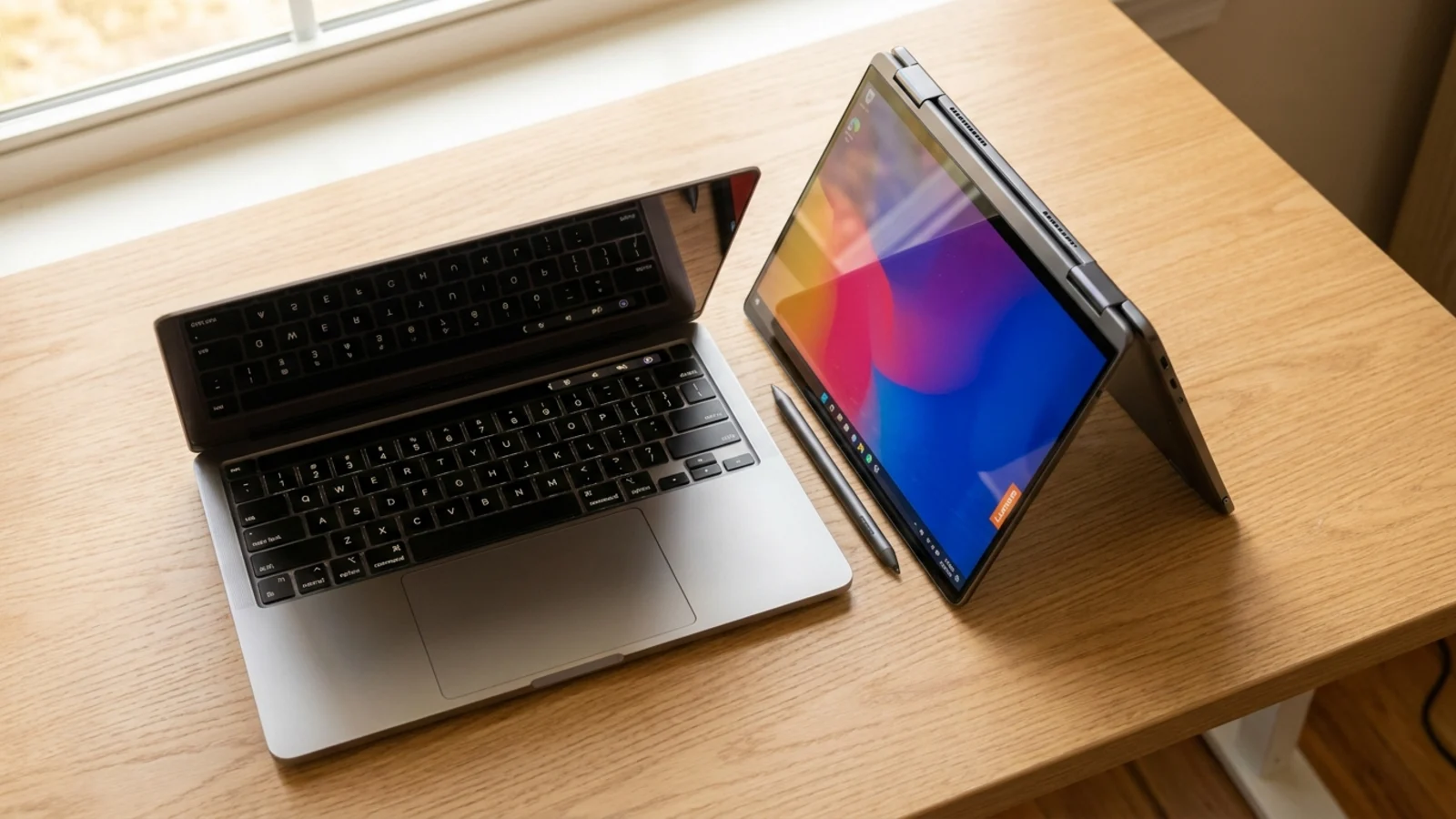
Traditional laptop (clamshell)
The classic design: a screen on a hinge that opens to a fixed range of angles. Some have touchscreens, but you cannot fold them into a tablet.
Convertible 2-in-1
The screen rotates on a hinge that folds all the way back, so the laptop turns into a thick tablet. You can also stand it up in tent mode for watching video or presenting. The keyboard is always attached. In our picks, the Lenovo Yoga 9i Aura Edition and the HP OmniBook X Flip 14 are both convertibles.
Detachable 2-in-1
A tablet with a keyboard that clips on and comes off. It is the lightest way to get a tablet and a laptop in one, but the tablet holds all the parts, which affects balance and cooling. The Microsoft Surface Pro (Copilot+ PC) in our picks is a detachable, listed at "1.97 lb", and its price note says "keyboard sold separately", which is common with this design. Always check whether the keyboard and pen are included.
2-in-1 vs laptop at a glance
Traditional laptop | Convertible 2-in-1 | Detachable 2-in-1 | |
|---|---|---|---|
Best for | Typing, everyday work, performance | Notes, sketching and laptop work in one device | Tablet-first use with occasional typing |
Pen support | Rare | Common, check if the pen is included | Common, check if the pen is included |
Typing on a lap | Stable | Stable | Can be wobbly |
Tablet use | No | Yes, but heavier than a real tablet | Yes, the most tablet-like |
Performance for the price | Usually the most | Similar to laptops, often costs more | Limited by the thin tablet body |
Keyboard included | Yes | Yes | Not always |
Where a 2-in-1 shines
Handwritten notes and sketching
If you think better with a pen, a 2-in-1 with pen support is a genuine upgrade. Students can annotate slides, solve equations and draw diagrams. Designers and illustrators can sketch directly on the screen. Our laptops for designers include options for people who draw as part of their work.
Reading and media
Folding the screen back turns a convertible into a large tablet for reading documents, textbooks and comics. Tent mode is handy for watching video on a plane tray or in the kitchen.
Presenting and sharing
Flip the screen around and the people across the table can see it without crowding behind you. This is useful for teachers, salespeople and anyone who walks clients through a document.
Touch-first apps
Some people simply prefer to touch the screen for scrolling, zooming and navigating. A 2-in-1 makes that comfortable in every position.
Where a traditional laptop wins
Typing and everyday work
If your day is mostly email, documents, spreadsheets and coding, the tablet modes rarely get used. A traditional laptop puts all of the budget into the keyboard, screen, processor and battery instead.
Performance and value
The hinge, touch layer and pen support all add cost. At the same price, a traditional laptop often gives you a faster processor, more memory or a better battery. For gaming and heavy creative work, nearly all of the most powerful laptops are clamshells.
Weight and balance
Convertibles carry the extra weight of a sturdier hinge and touchscreen, and detachables put most of their weight in the screen. If you carry the laptop every day and do not need a pen, our lightweight laptop picks are often the better fit.
Simplicity
There are fewer parts to break, no pen to lose and no keyboard to buy separately.
Questions to ask yourself
Will I use a pen every week? If yes, a 2-in-1 is worth it. If you are not sure, you probably will not.
Do I want a tablet, or a laptop that can be a tablet? If tablet use comes first, consider a detachable. If laptop use comes first, a convertible is the safer choice.
Do I type on my lap? Convertibles and traditional laptops are stable on a lap. Detachables with kickstands can be awkward.
What is my budget? A 2-in-1 costs more for the same performance. Make sure you will use the features you pay for.
Which operating system? Windows offers the widest choice of 2-in-1s. ChromeOS has affordable convertibles, such as the Acer Chromebook Plus Spin 714, whose display listing in our picks includes "stylus support". Our Chromebook guide covers these in more detail.
Who should buy which
Students who take handwritten notes: a convertible with pen support. If you type most notes, a traditional laptop is fine. Our student laptop picks cover both.
Artists, designers and note-takers who draw: a 2-in-1 with good pen support and a color-accurate screen.
Frequent travelers who mostly type: a light traditional laptop.
Gamers and video editors: a traditional laptop, for the performance and cooling.
Tablet users who need occasional typing: a detachable.
If you are still unsure, the free laptop quiz that asks about your must-haves lets you choose a touchscreen or 2-in-1 design as a requirement and suggests guides and picks that match.
What to check before you buy a 2-in-1
If you decide a 2-in-1 is right for you, these details separate a good one from a frustrating one:
Hinge quality: on a convertible, the hinge should hold the screen firmly in every mode and not wobble when you tap the display. Reviews and a quick test in a store will tell you a lot.
Pen experience: check whether the pen is included, how it charges or is powered, where it is stored, and whether the screen has palm rejection so your hand does not leave marks.
Screen finish: glossy touchscreens show more reflections. If you work near windows, look for a brighter screen or an anti-glare option.
Weight in tablet mode: hold it folded back with one arm. A convertible that feels fine on a desk can feel heavy as a tablet.
Keyboard on detachables: try typing on it, both on a desk and on your lap, and check whether it is backlit.
Ports: thin 2-in-1s often have few ports. Count what you need and plan for an adapter if necessary.
Total cost: add the pen, the keyboard and any case before you compare prices with a traditional laptop.
A traditional laptop deserves the same scrutiny in the areas you will use every day: keyboard comfort, screen quality, battery life in independent tests and the warranty.
Frequently asked questions
Is a 2-in-1 as good as a regular laptop?
For everyday work, a good convertible performs much like a traditional laptop at a similar price tier. Detachables can be more limited by their thin tablet bodies. For gaming and heavy creative work, traditional laptops usually perform better.
Are 2-in-1 laptops durable?
A well-built convertible with a solid hinge holds up well. Check reviews for hinge stiffness and screen wobble, and handle the detachable keyboard connectors with care.
Do 2-in-1 laptops come with a pen?
Some do, many do not. Check the box contents before buying, because a pen and a keyboard (for detachables) can add noticeably to the total cost.
Can a 2-in-1 replace a tablet?
A convertible works as a tablet for notes, reading and media, but it is heavier than a dedicated tablet. A detachable is closer to a real tablet experience.
See our picks: the best 2-in-1 laptops
Recommended guides
- Best 2-in-1 laptopsNote takers, artists and presenters who want one device that works as a laptop and a tablet.
- Our student laptop picksHigh school and college students who need a laptop for notes, essays, research and streaming.
- Mid-range laptopsBuyers who want a well built, fast laptop without paying flagship prices.
- Cheap laptops under $500Anyone who needs a reliable laptop for school, work or home on a tight budget.
Or browse all our laptop buying guides.